What it is for
You suspect a theme runs through a text without being its subject: economy in a nature documentary, religion in a battlefield speech. You name the theme, and at-field returns one score with the matches behind it. The quieter the theme, the more the number helps.
The tool is deliberately narrow. It measures one theme in one transcript.
How it works
- The tool loads the transcript (
.srt,.vttor plain text). The language comes from the text itself, or from--language. - A local model, served by Ollama, expands the theme into single words in that language. Afterwards, code removes phrases, the theme's own words, and inflected variants of a word already listed.
- Each word is matched against the transcript by word boundary, ignoring case.
- The report gives the lexical saturation (distinct words found divided by words in the field), the matches per 1,000 words, and where the score falls between two boundaries you can set (10% and 70% by default). Input with timing also gets timestamped occurrences.
An example run
Lincoln's Gettysburg Address (public domain) dedicates a battlefield cemetery. Suppose you suspect that religion runs through it. The first run uses the default model, which builds the vocabulary for you.
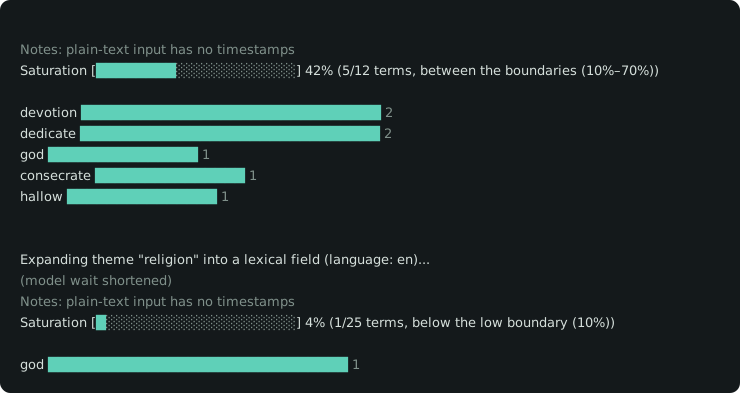
$ at-field examples/gettysburg.txt --theme "religion"Saturation [█░░░░░░░░░░░░░░░░░░░] 4% (1/25 terms, below the low boundary (10%)) god ██████████████████████████████ 1
Field proposed by the model: 25 words, matches highlighted
god bible church sacred faith belief pagan pilgrimage holy monk priest preacher temple mosque shrine catholic prophet zakat benediction worship saint sacrament hymn miracle sin
The model proposed 25 words and the speech uses one of them, "god". A score of 4% says religion is present and takes up little of the text.
If you already know which words you are looking for, hand them over as a wordlist with --lexic. The tool uses them as written.
$ at-field examples/gettysburg.txt --theme "religion" --lexic examples/religion-words.txtSaturation [████████░░░░░░░░░░░░] 42% (5/12 terms, between the boundaries (10%–70%)) devotion ██████████████████████████████ 2 dedicate ██████████████████████████████ 2 god ███████████████ 1 consecrate ███████████████ 1 hallow ███████████████ 1
Wordlist supplied by the user: 12 words, matches highlighted
god consecrate hallow devotion dedicate holy sacred prayer faith divine blessed worship
Five of the twelve words appear, 42%, with "devotion" and "dedicate" twice each. The same speech, asked a sharper question, gives a fuller answer.
Using it well
Good fits
- Testing a hunch about a theme that sits beneath the text's subject.
- Running one theme over several transcripts to see which ones carry it most.
- Finding where a theme appears. Give it an
.srtor.vttfile and the report lists the timestamped passages. - Checking a vocabulary you care about, through
--lexic.
Getting a reliable reading
- Read the field before the score. The report lists every word the model proposed, so a missing word is easy to spot. In the example above, the speech leans on "consecrate", "hallow" and "devotion", and the model proposed none of them. A wordlist supplies them, as in the second run.
- Raise
--field-sizefor a long transcript. A longer text has room for more of the theme's vocabulary, so a larger field measures it more finely. The default is 25 words. - Choose the model for the language. The default,
qwen2.5:3b, gave usable French fields in testing, where models under 1B parameters returned unusable ones. Change it with--model. - Include the word forms you want. Matching is literal, so "jeu" and "jeux" are separate words.
- Set the boundaries for your material. The 10% and 70% defaults are starting points, adjustable with
--saturation-lowand--saturation-high.
Where another tool fits better
- For a summary of what a text covers, use a summarizer. at-field answers one question about one theme you supply.
- For audio, transcribe first with a tool such as Whisper, Vibe or YouTube captions, then pass the transcript in.
- For discovering themes, a topic-modelling tool suggests them. at-field measures the one you name.
Install
Install Ollama and pull the default model, then install at-field with npm.
$ ollama pull qwen2.5:3b
$ npm install -g at-field
The default model is about 1.9 GB and downloads once. If it is missing, at-field shows its size and offers to pull it. A run with no terminal (a script or CI job) starts no download and prints the ollama pull command instead.
To try it without installing, run npx at-field transcript.srt --theme "economy". npx fetches the package on first use, so the first start takes longer. Set up Ollama and the model beforehand, because npx fetches only at-field.
Under the hood
- Language
- TypeScript on Node 22+, ESM
- Dependencies
- commander, franc-min, iso-639-3 (all pure JavaScript)
- Model
- Any Ollama model; default
qwen2.5:3b - Quality
- Unit tests on Node's built-in runner, CI on Node 22 and 24
- License
- MIT
Performance
Theme expansion is the slow step, and its speed depends on the hardware running Ollama. Ollama uses a supported GPU automatically, and a GPU is recommended if you run at-field often. On a CPU-only machine, the default 3B model took about 2 to 5 minutes per run in testing. A smaller model (--model qwen2.5:0.5b) runs faster and gives weaker fields outside English. A wordlist (--lexic) skips expansion and answers in seconds.